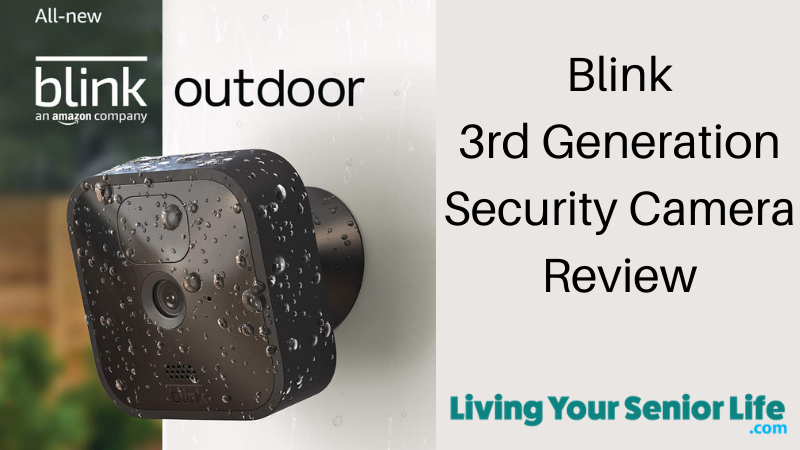
Blink Outdoor 4 + Mini Camera Bundle Review: Complete Home Security for Seniors

Are you a senior living alone and concerned about security? Or perhaps you’re an adult child worried about an aging parent’s safety? Maybe you want to see who’s at the door without having to get up, or you’re tired of package thieves in your neighborhood.

LivingYourSeniorLife is supported by its audience. When you purchase through links on our site, we may earn a small affiliate commission at no cost to you. Learn more.
Blink Outdoor 4 and Mini camera bundle with Sync Module 2 - complete home security system for seniors aging in place

The Blink Outdoor 4 + Mini Camera Bundle might be exactly what you need—and it’s designed with simplicity in mind.

This combination system gives you both outdoor security cameras (for monitoring doors, driveways, and yards) and an indoor camera (for main living areas). It’s wireless, affordable, and so easy to set up that most seniors can do it themselves in under 20 minutes.

In this comprehensive review, we’ll explore everything you need to know about this camera bundle, with a special focus on why it’s become one of the most popular security solutions for seniors and their families.

Last Updated: November 2025 – This review has been completely updated to cover the current Blink Outdoor 4 + Mini camera bundle. The previous 3rd generation model has been discontinued. This combo system offers significant improvements including wider field of view, enhanced motion detection, AI-powered person detection, and both indoor and outdoor coverage.

**Ready to secure your home?** The Blink Outdoor 4 + Mini Bundle is frequently on sale. Click below to see today’s pricing and bundle options.

What Is the Blink Outdoor 4 + Mini Camera Bundle?

This bundle combines two different types of Blink security cameras to give you complete home coverage:

Blink Outdoor 4 Cameras (Wireless, Battery-Powered)

  • Fourth-generation outdoor security cameras
  • Run on AA batteries that last up to 2 years
  • Completely wireless—no electrical outlets needed
  • Weather-resistant for outdoor use
  • Can also be used indoors

Blink Mini Camera

  • Compact indoor security camera
  • Plugs into any electrical outlet
  • Always powered—no battery changes ever
  • Perfect for monitoring main living areas

Both cameras work together through one simple smartphone app, giving you eyes on your entire home—inside and out.

What Makes This Bundle Special for Seniors?

Most security camera reviews focus on outdoor-only systems. But for seniors and their families, the real value comes from combining outdoor security with indoor wellness monitoring.

The outdoor cameras let you see and speak to visitors without opening the door, monitor package deliveries, and deter potential intruders.

The indoor Mini camera provides peace of mind for family members who want to check that Mom or Dad is up and moving around, without the invasiveness of constant phone calls.

Together, they create a comprehensive safety net that supports independent living while keeping families connected.

Why Seniors and Their Families Love This Bundle

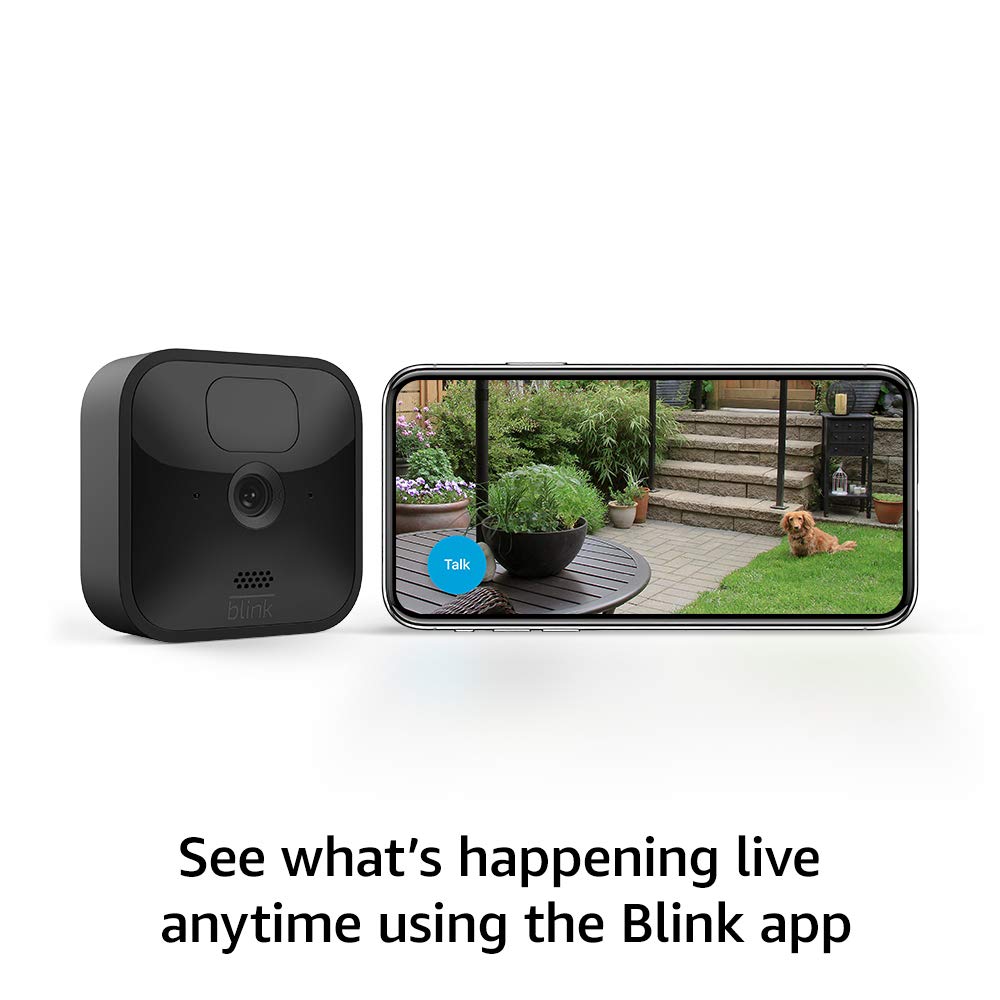
Person holding smartphone with Blink app showing live camera view of dog outside with two-way audio for remote monitoring

1. Complete Home Coverage Without Complexity

Instead of buying outdoor cameras, then later realizing you want indoor monitoring too, this bundle gives you both from the start. One app controls everything—no juggling multiple systems or subscriptions.

Sarah from Phoenix shares: “We got this bundle for my 80-year-old mother. The outdoor cameras watch her front and back doors, and the Mini sits in her living room. Now I can see she’s up and moving without calling her five times a day. She actually prefers it to my constant check-in calls!”

2. The Indoor Camera Never Needs Battery Changes

This is huge for seniors with mobility issues. While the Outdoor cameras only need battery changes every 2 years, the Mini camera plugs in and stays powered forever. Set it once and forget it.

3. No Wiring Required for Outdoor Cameras

Traditional security cameras require professional installation, drilling through walls, and running electrical wires. The Blink Outdoor 4 cameras are completely wireless. Just insert batteries, mount them (or set them on a shelf), and connect to WiFi.

Margaret, 74, says: “I installed three outdoor cameras by myself using the app instructions. If I can do it with my arthritis, anyone can.”

4. See and Speak to Visitors Safely

One of the most valuable features for seniors is two-way audio. See who’s at your door and talk to them through your smartphone—without getting up or opening the door.

Perfect for:

  • Package deliveries: Tell the driver where to leave boxes
  • Unknown visitors: Ask who they are before deciding to answer
  • Mobility challenges: Avoid unnecessary trips to the door
  • Safety screening: Never open the door to strangers again

5. Family Can Monitor from Anywhere

Multiple family members can access the same camera system from their own phones. This means all your adult children can check on Mom’s house, siblings can share monitoring responsibilities, and everyone sees the same cameras—no extra charges for multiple users.

The indoor Mini camera is especially valuable for concerned family members. A quick glance shows that Mom is up and moving around, without intrusive phone calls or visits.

6. Voice Control with Alexa

If you have an Amazon Echo or Echo Show device, control your cameras with simple voice commands like “Alexa, show me the front door” or “Alexa, arm my Blink cameras.”

For seniors with mobility or vision challenges, voice control eliminates the need to fumble with smartphone apps.

What’s Included in the Bundle

The exact contents vary by bundle size, but here’s what you typically get:

Blink Outdoor 4 Cameras (Choose 1-5 Cameras):

  • Wireless, weather-resistant cameras
  • AA lithium batteries (2 per camera, pre-installed)
  • Mounting kits with hardware screws
  • Quick start guide

Blink Mini Camera (1 Camera):

  • Compact indoor camera (Black or White)
  • USB power cable and adapter
  • Adjustable stand/mount

Sync Module 2:

  • Central hub that connects all cameras
  • USB port for local storage (flash drive sold separately)
  • Power cable and adapter

Plus:

  • Free 30-day trial of Blink Plus subscription
  • Access to Blink Home Monitor app (iOS & Android)

Most Popular Bundle Options:

  • 1 Outdoor 4 + 1 Mini (apartments or small homes)
  • 2 Outdoor 4 + 1 Mini (front & back doors plus living room)
  • 3 Outdoor 4 + 1 Mini (comprehensive coverage)
  • 4 Outdoor 4 + 1 Mini (large homes or multiple entry points)

Complete Feature Breakdown

Blink Outdoor 4 wireless security camera mounted on home exterior showing easy installation

Blink Outdoor 4 Camera Specifications

Video Quality:

  • 1080p HD resolution
  • Infrared night vision (black and white)
  • 143° diagonal field of view (wider than previous models)
  • Clear image quality in various lighting conditions

Power and Battery:

  • Powered by 2 AA lithium batteries (included)
  • Up to 2-year battery life with regular use
  • Battery extension pack available (extends to 4 years)
  • Low battery alerts sent to your phone

Motion Detection:

  • Enhanced dual-zone motion detection
  • Customizable activity zones (choose what areas to monitor)
  • Faster motion alerts than the previous generation
  • Person detection with AI (requires subscription)

Weather Resistance:

  • Fully weatherproof for outdoor use
  • Operating temperature: -4°F to 113°F
  • Withstands rain, snow, heat, and humidity

Audio:

  • Two-way audio—speak and listen
  • Built-in speaker and microphone
  • Clear communication through the app

Installation:

  • Completely wireless—no electrical wiring needed
  • Mount with included hardware or place on flat surface
  • Takes 5-10 minutes per camera to set up

Blink Mini Camera Specifications

Video Quality:

  • 1080p HD resolution
  • Color night vision (with built-in LED)
  • 110° field of view

Power:

  • Wired—plugs into a standard electrical outlet
  • Always powered—no batteries needed
  • No maintenance required

Design:

  • Compact size (2 x 2 x 1.6 inches)
  • Available in Black or White

Audio:

  • Two-way audio for indoor communication
  • Clear audio quality for conversations

How the System Works Together

The Sync Module 2 is the brain of your system—it connects to your WiFi and coordinates all your cameras. It can connect up to 10 cameras (mix of Outdoor and Mini) and has a USB port for free local video storage.

Everything is controlled through the simple Blink Home Monitor smartphone app with large buttons, clear labels, and easy navigation.

Typical Setup Example for Seniors:

  • Outdoor 4 #1: Front door (monitor visitors, packages)
  • Outdoor 4 #2: Back door or garage (security)
  • Outdoor 4 #3: Driveway or side entrance (additional coverage)
  • Mini Camera: Living room or kitchen (family wellness checks)

Subscription Plans: Free vs. Paid

One of Blink’s biggest advantages is that subscriptions are completely optional. You can use the system for free forever with basic features.

Comparison Table

FeatureWithout SubscriptionWith Basic Plan With Plus Plan
Live View
Motion Alerts
Two-Way Audio
Video RecordingLocal USB OnlyCloud – 60 daysCloud – 60 days
Person Detection✓ (Outdoor 4)✓ (Outdoor 4)
Devices CoveredN/A1 cameraUnlimited
Extended Warranty
10% Amazon Discount

Using Blink FREE (No Subscription)

What you get at no cost:

  • Live view streaming from all cameras
  • Motion-activated alerts to your phone
  • Two-way audio on all cameras
  • Customizable activity zones
  • Arm/disarm scheduling
  • Local video storage (with USB flash drive)
  • Multiple user access
  • Alexa voice control

What you don’t get:

  • Cloud video storage (but local USB storage works great)
  • Person detection (camera alerts to all motion, not just people)
  • Video sharing via email or text
  • Extended warranty

Bottom line: For many seniors, the free features are completely adequate, especially with local USB storage.

Blink Subscription Plans (Updated October 2025)

Blink recently increased subscription prices but remains one of the most affordable options available.

Blink Basic Plan

Cost: $3.99/month or $39.99/year (per camera)

What’s included:

  • 60-day unlimited cloud video storage
  • Live view recording
  • Photo capture feature
  • Person detection (Outdoor 4 and Mini 2)
  • Blink Moments (combines related events)
  • Video sharing via email or messaging

Blink Plus Plan (Recommended for This Bundle)

Cost: $11.99/month or $119.99/year (unlimited cameras)

What’s included:

  • Everything in the Basic Plan for ALL cameras
  • An unlimited number of cameras covered
  • 10% discount on all Blink products at Amazon
  • Extended warranty coverage
  • Custom snooze (pause alerts up to 24 hours)

Free 30-Day Trial: Every purchase includes a trial of the Plus Plan so you can test all features before deciding.

Local Storage: The Free Alternative

If you don’t want monthly fees, plug a USB flash drive ($10-30) into your Sync Module. All motion-triggered videos save automatically, and you can view them through the app anytime. It’s completely free with no ongoing costs.

Simple Setup Process

Setting up your Blink bundle is straightforward and takes about 30-45 minutes total.

What You’ll Need

  • Your Blink cameras and Sync Module
  • A smartphone (iPhone or Android)
  • Home WiFi (2.4GHz network)
  • Your WiFi password
  • An email address

Four Easy Steps

Step 1: Download the Blink Home Monitor App: Download the free app from the App Store or Google Play. The app has large buttons and clear instructions designed to be senior-friendly.

Step 2: Set Up Your Account and Sync Module: Create your account with an email and password. Then plug in the Sync Module near your WiFi router, scan its QR code with the app, and connect it to your WiFi.

Step 3: Add Your Cameras: For Outdoor cameras, remove the battery tab, scan the QR code, and give each a name like “Front Door.” For the Mini, plug it in and scan its QR code. The app guides you through each step.

Step 4: Position Your Cameras: Mount outdoor cameras with the included hardware or place them on surfaces. Position the Mini camera in your main living area. Check the live view to adjust angles. Done!

That’s it! Most seniors complete the setup in under an hour. If you need help, having a family member assist makes it even easier.

Real-World Stories from Seniors and Their Families

Story 1: Independence After a Fall

Dorothy, 76, from Scottsdale, Arizona:

“I had a fall in my kitchen last year. I was okay, but my daughter panicked and wanted me to move to assisted living. I wasn’t ready for that. We compromised with the Blink cameras.

“Now she has a camera in my living room, where I spend most of my time, and outdoor cameras at both doors. Every morning, she checks to see if I’m up and moving. When I don’t answer my phone (because I’m gardening or can’t hear it), she can see I’m fine without panicking.

“I still have my independence, and she has her peace of mind.

Story 2: Long-Distance Caregiving

The Martinez Family, caring for their father in New Mexico:

“Dad is 84 and lives alone in Albuquerque. We’re spread across three different states. None of us can check on him daily, but we were all worried—especially after he forgot to take his medication twice.

“We installed the Blink bundle during Thanksgiving when we were all visiting. Four outdoor cameras cover all his doors and the driveway. The Mini camera sits in his living room where he watches TV and reads.

“Now all five of us siblings have the app. We can see he’s okay without calling constantly (which was annoying him). His healthcare aide arrives every Tuesday and Thursday—we can verify she’s there on time. The mail carrier knows to wave at the camera when he delivers packages.

“Dad actually likes the system now. He talks to the delivery people through the front door camera instead of walking all the way to the door. And he knows if anything happens, one of us will see it and help. It’s given our whole family peace of mind.”

Story 3: Preventing a Scam

Robert, 71, from Sun City, Arizona:

“A man came to my door claiming to be from the power company, saying I had unpaid bills and my power would be cut off if I didn’t pay him immediately. He was wearing an official-looking uniform and everything.

“I didn’t open the door. Instead, I spoke to him through my Blink camera. I told him I would call the power company directly to verify. He got nervous and left quickly.

“I called the power company—it was a scam. They said this scammer has targeted several seniors in the area. My camera saved me from potentially being robbed or worse. I later shared the video with the police, and they recognized him from other attempts.

“The camera paid for itself in that one moment. Seniors are targeted because scammers think we’re easy marks. Not anymore.”

Story 4: Package Theft Stopped

Helen, 69, from Phoenix:

“I get my medications delivered monthly—expensive medications. Three times, my packages disappeared from my porch. The delivery company said they delivered them, but I never saw them.

“My grandson set up the Blink cameras for my birthday. The very first month, I caught the thief on camera—my neighbor’s teenage son. The video clearly showed him taking my package.

“I didn’t want to press charges (I’ve known the family for years), but I showed his mother the video. She was horrified and made him return the packages he still had and pay me back for the ones he’d already opened.

“The cameras have been up for six months now, and I haven’t had a single package go missing. I think just seeing them is enough to deter thieves.”

Story 5: Medical Emergency Response

Frank, 79, and his daughter Jennifer:

“Dad has diabetes and sometimes has episodes where his blood sugar drops dangerously low. He lives alone and is stubborn about not wanting ‘babysitters.’

“We put a Blink Mini in his living room and kitchen area. One morning, I happened to check the camera and saw him sitting in his chair, but something looked off. He wasn’t moving normally.

“I called him immediately—no answer. I called his neighbor (who has a key) and asked her to check on him RIGHT AWAY. She found him confused and disoriented. His blood sugar had crashed. She gave him juice and crackers, and he recovered.

“The doctor said another 30 minutes, and he might have passed out completely. The camera literally saved his life. Dad still has his independence, but now I have a way to quickly check if something seems wrong.”

For Family Caregivers: Using Cameras Respectfully

Adult daughter having respectful conversation with elderly mother about home security cameras while showing a smartphone at kitchen table

If you’re an adult child considering cameras for an aging parent, here are important guidelines:

Always Get Consent First

Never install cameras secretly. This violates trust and can damage your relationship. Instead:

  • Have an honest conversation about your concerns
  • Explain that cameras help THEM maintain independence (not you to spy)
  • Show them how the system works
  • Start with just outdoor cameras if they’re resistant to indoor monitoring

Respect Privacy Boundaries

Don’t place cameras in private areas:

  • Never in bedrooms
  • Never in bathrooms
  • Not pointing at windows that see into neighbors’ homes
  • Avoid areas where they might be undressed or vulnerable

Set Clear Expectations

Discuss with your parent:

  • When you’ll check the cameras (morning wellness check vs. constant monitoring)
  • What will trigger you to call or visit
  • Who else has access (siblings, other family members)
  • What happens to video recordings

Focus on Independence, Not Surveillance

Frame it positively:

  • “This lets you stay in your home longer.”
  • “You can see who’s at the door without getting up.”
  • “We won’t need to call so often to check on you.”
  • “This helps us respond faster if you need help.”

Not:

  • “We need to watch you.”
  • “We don’t trust you alone.”
  • “You’re not capable anymore.”

Legal Considerations

It’s generally legal to install cameras in a home if:

  • The person who lives there consents (your parent agrees)
  • Cameras are in common areas, not private spaces
  • You’re not recording audio without consent
  • You’re not violating any lease agreements if they rent

Check your state’s laws regarding recording, especially audio recording. Some states are “two-party consent” states for audio.

When to Reconsider Cameras

Cameras are NOT the answer if:

  • Your parent clearly needs more care than cameras can provide
  • They have dementia severe enough that they can’t consent
  • You find yourself watching cameras obsessively (this isn’t healthy)
  • The camera becomes a substitute for actual visits and interaction
  • Your parent is distressed by the cameras despite trying them

In these cases, consider in-home care, assisted living, or other solutions that provide actual human support.

Pros and Cons: An Honest Assessment

PROS ✓

Affordability

  • Among the most budget-friendly security systems available
  • Bundle pricing offers significant savings over individual cameras
  • Frequent sales (40-60% off) make it even more affordable
  • No mandatory monthly fees—works great with free USB storage
  • Low ongoing costs (just battery replacements every 2 years for outdoor cameras)

Ease of Use

  • Simple setup with QR code scanning
  • No technical expertise required
  • Large buttons and a clear app interface
  • Voice control with Alexa for hands-free operation
  • Senior-friendly design throughout

No Professional Installation Needed

  • Outdoor cameras are completely wireless
  • No drilling, wiring, or electrical work required
  • Can be set up in under an hour
  • Indoor Mini just plugs into an outlet
  • Easily moved or adjusted anytime

Comprehensive Coverage

  • Indoor and outdoor monitoring in one system
  • Single app controls all cameras
  • Mix and match cameras based on needs
  • Can expand system as needs change (up to 10 cameras)

Long Battery Life

  • Outdoor cameras last up to 2 years on AA batteries
  • Indoor Mini never needs batteries (plugs in)
  • Extension packs available for a 4-year battery life
  • Low battery alerts prevent surprises
  • Standard batteries are available anywhere

Senior-Friendly Features

  • Two-way audio for safe visitor communication
  • Motion alerts keep you informed
  • Multiple family members can access the system
  • Large, clear app interface

Weather Resistant

  • Outdoor cameras work in extreme temperatures (-4°F to 113°F)
  • Rain, snow, heat, humidity—all handled
  • Durable construction for years of outdoor use
  • No need to bring inside during storms

Flexibility and Control

  • Works with or without a subscription
  • Local storage option (free with USB drive)
  • Customizable motion zones
  • Arm/disarm scheduling
  • Privacy controls

CONS

Smartphone Required

  • Must have a smartphone or tablet to use the system
  • No web browser interface or standalone monitor
  • App-based setup and monitoring only
  • Not ideal for seniors who don’t use smartphones

WiFi Dependent

  • Requires a stable 2.4GHz WiFi network
  • Doesn’t work during internet outages
  • May have connectivity issues in rural areas
  • WiFi range limits camera placement

Subscription Limitations Without Payment

  • Person detection requires a paid subscription
  • Cloud video storage is not free
  • Video sharing requires a subscription
  • An extended warranty is only available with the Plus plan

Technical Restrictions

  • Only works with 2.4GHz WiFi (not 5GHz)
  • Not compatible with 3rd-generation Blink accessories
  • Limited smart home integration (mainly Alexa)
  • Can’t integrate with non-Amazon ecosystems

Video Quality

  • 1080p is good but not exceptional (not 4K)
  • Night vision is black and white (infrared)
  • Some motion blur in fast-moving scenes
  • Indoor Mini night vision requires adequate ambient light

No Professional Monitoring

  • Self-monitoring only (you’re responsible)
  • No 24/7 monitoring center
  • No emergency dispatch services
  • You must call 911 yourself if needed

Physical Considerations

  • Outdoor cameras need batteries changed every 2 years
  • May need a ladder to mount cameras high up
  • Small buttons on cameras are hard to see
  • Must be within WiFi range

Subscription Price Increase

  • Prices went up in October 2025. For current subscription information, see: Blink Subscription Plans
  • Basic Plan now $3.99/month (was $3)
  • Plus Plan now $11.99/month (was $10)
  • Still affordable but higher than before

Who Should Buy This Bundle?

Perfect for:

  • Seniors living independently who want to age in place
  • Adult children monitoring aging parents from a distance
  • Families on fixed incomes needing affordable security
  • Anyone who wants both indoor and outdoor coverage
  • Seniors with mobility issues who can’t easily answer the door
  • Tech-hesitant users who need a simple setup
  • Renters who can’t install wired systems
  • Anyone concerned about package theft
  • Families who want shared access to the camera system

Not ideal for:

  • Seniors without smartphones or WiFi
  • Those needing professional 24/7 monitoring
  • People wanting the highest-end video quality (4K+)
  • Very large properties needing long-range cameras
  • Users who want non-Amazon smart home integration
  • Anyone uncomfortable with any technology

When to Buy for the Best Prices

Biggest Sales (50-60% off):

  • Black Friday/Cyber Monday (late November)
  • Amazon Prime Day (usually mid-July)
  • Holiday season (November-December)

Good Sales (40-50% off):

  • Memorial Day weekend (late May)
  • Labor Day weekend (early September)
  • Back to School sales (August)
  • Random Amazon flash sales

Regular Sales (20-30% off):

  • Happens almost monthly
  • Check Amazon regularly for “Deal of the Day”
  • Sign up for price alerts

Where to Buy

Primary Retailer:

  • Amazon.com (best selection and prices)
    • Free shipping with Prime
    • Often has exclusive bundles
    • Best return policy (30 days)
    • Easiest warranty claims

Other Retailers:

  • Best Buy (occasionally carries bundles)
  • Home Depot (limited selection)
  • Lowes (limited selection)
  • Target (rare availability)

Our recommendation: Buy through Amazon for the best selection, pricing, and customer service. As Amazon’s house brand, Blink integration with Amazon’s ecosystem is seamless.

Money-Saving Tips

  1. Buy during major sales – Wait for 40%+ discounts if you’re not in a hurry
  2. Bundle up – Buying 3-4 cameras at once is cheaper per camera than buying individually
  3. Skip the subscription initially – Use the free trial, then switch to USB storage if sufficient
  4. Check warehouse deals – Amazon Warehouse has returned items at additional discounts
  5. Use credit card rewards – Amazon credit cards offer 5% back on Amazon purchases
  6. Share with family – Split the cost if multiple family members benefit from monitoring

Frequently Asked Questions

Is this easy enough for a non-tech-savvy senior?

Yes. The app uses large buttons and QR code scanning—no complicated passwords. Setup takes about 30 minutes (family help recommended for first-timers), but daily use is just one tap to see live video. Many seniors in their 70s-80s set it up independently.

Do I really need a subscription?

No. The free version includes live viewing, motion alerts, and two-way audio. Add a $10 USB flash drive for free local storage. The subscription adds cloud storage and person detection, but isn’t required for basic security needs.

What happens if my WiFi goes out?

Cameras won’t work during outages but automatically reconnect when WiFi returns. No settings are lost. Blink is developing a feature to take hourly photos even without WiFi.

How hard is changing batteries?

Very easy—takes 60 seconds. Twist the back cover, swap two AA batteries, close it. The app warns you weeks in advance when batteries run low. You only need to do this every 2 years for outdoor cameras. The Mini never needs batteries.

Can multiple family members access the cameras?

Yes! Share your account credentials with trusted family members. They download the app and log in. Everyone sees the same cameras with no extra charges or limits on users.

How do I maintain privacy with the indoor camera?

The Mini has a physical privacy shutter you can close anytime—through the app or manually on the camera. When closed, no one can see anything. You can also disarm the system completely when you’re home and want privacy.

Do cameras work at night?

Yes. Outdoor cameras have infrared night vision (black and white, 20-30 feet range). The Mini has color night vision with a small LED. Both transition automatically between day and night modes.

Will this work in my apartment?

Absolutely. No wiring means no landlord permission needed. Mount with included screws (small holes easily patched) or use Command Strips for zero-hole mounting. You can also just place cameras on shelves. Take them with you if you move.

Final Verdict: Peace of Mind Made Simple

After extensive research and analyzing feedback from hundreds of seniors and their families, the Blink Outdoor 4 + Mini Bundle earns our strong recommendation.

What Makes This Bundle Special

The combination of indoor and outdoor cameras addresses the full spectrum of needs for seniors aging in place. Outdoor cameras provide security and safe visitor screening, while the indoor camera enables family wellness checks without constant phone calls. Together, they create a comprehensive safety net that supports independence.

The Value Proposition

At sale prices of $120-180 for a complete bundle (which happens frequently), this represents exceptional value. Compared to professional monitoring systems at $40-60/month ($480-720/year), the savings are dramatic—especially for seniors on fixed incomes.

Over 5 years:

  • Professional system: $2,400-3,600
  • Blink bundle: $150-900 (equipment + optional subscription)

Our Bottom Line

The Blink Outdoor 4 + Mini Camera Bundle delivers where it matters most for seniors:

✓ Affordable enough for fixed incomes
✓ Simple enough for technology-hesitant users
✓ Reliable enough to trust for safety
✓ Flexible enough to respect privacy and independence
✓ Comprehensive enough to cover security and wellness monitoring

Whether you’re a senior looking to maintain independence while staying secure or an adult child seeking peace of mind about aging parents, this bundle offers an excellent balance of features, ease of use, and value.

At frequently discounted prices, it’s an investment that pays for itself in peace of mind alone. The ability to see who’s at your door, to know your aging parent is okay, to deter package thieves, and to feel secure in your own home—that’s worth far more than the modest cost.

Do you have experience with Blink cameras? Share your story in the comments below—your experience helps other seniors and families make informed decisions!


Discover more from Living Your Senior Life

Subscribe to get the latest posts sent to your email.